Add GPS overlays to your video, free, no watermark
Drop in your GPX/FIT and footage and get live speed, map, heart-rate and elevation gauges on your cycling, running or action-cam video. No install, no account, nothing uploaded.
100+
gauges
3
export formats
∞
customization
100%
in your browser
Any sport
Looks right in any sport
Illustrative, see a real export below ↓
The editor
A real editor, right in your browser
- Drag, scale and restyle every gauge on the canvas
- A video timeline, trim clips, sync GPS, scrub frames
- One-click layouts, then make them yours
- Live preview at full export quality
See it in action
Real footage, live overlay, made with Stamptivity
A full edit and a vertical Short, both overlaid and exported on your own machine, nothing uploaded, no watermark. Works for 16:9 and 9:16.
How it works
From file to finished overlay in four steps
Drop in your files
Upload your ride or run, GPX or FIT, and your footage. Everything stays on your device; nothing is uploaded.
Pick a layout
Start from a one-click layout or drag gauges exactly where you want them. 100+ restylable gauges.
Sync to your video
Auto-align the GPS to your footage from the file’s timestamp, or nudge it on the timeline.
Export
Render an MP4, or a transparent WebM to drop the overlay onto any edit. No watermark, ever.
Built different
Transparent export
Export a WebM with real alpha, drop the gauges onto any footage in your editor. Or solid-colour for chroma-key.
Auto-sync GPS ↔ video
Aligns telemetry to your footage from the file’s timestamp, or nudge it by hand on the timeline.
9 layouts, 100+ gauges
Start rich or minimal, then recompose freely, every gauge restyles, rebinds and moves.
Gauges
100+ gauges, from clean classics to ones with life in them
Same ride, same numbers. On the left, the classic dials and bars. On the right, ready-made gauges with a beating heart, a swinging needle, a turning drivetrain and fire on the speed bar, and the effects behind them are yours to use on any gauge you build.
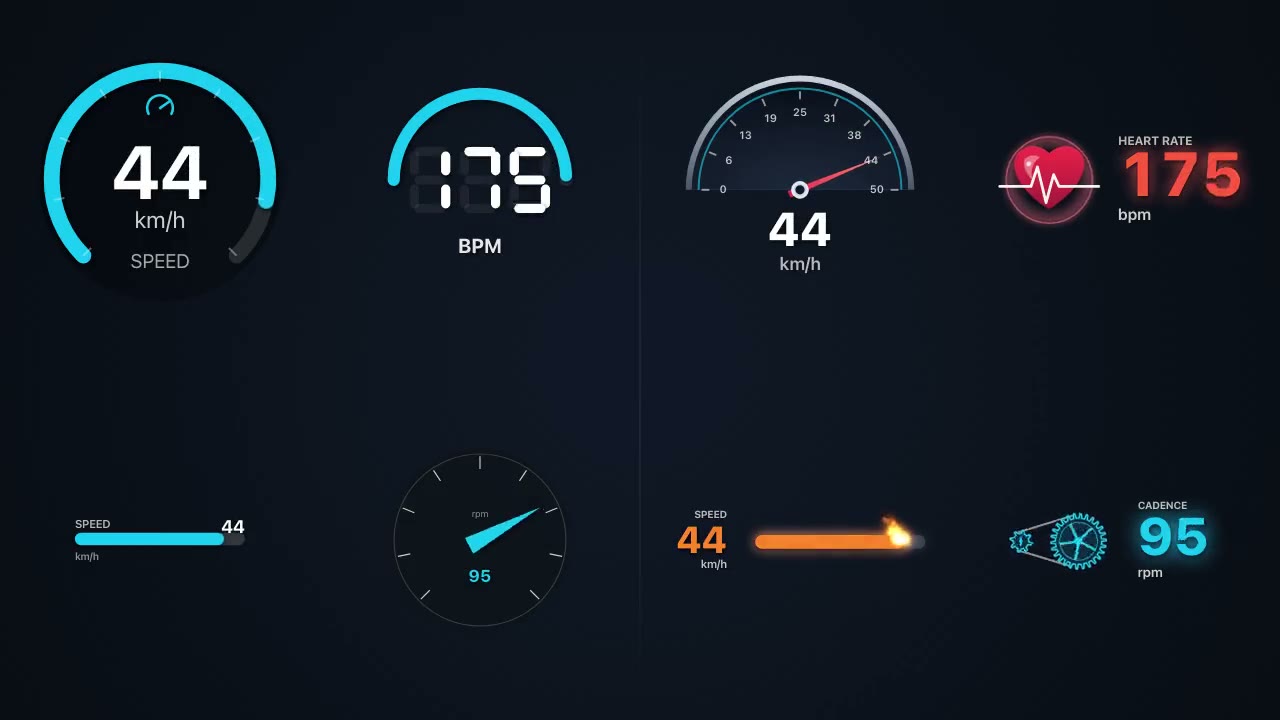
Speed · heart rate · power · cadence · temperature · elevation · slope · distance · pace · VAM & vertical speed · heading · G-force · time · coordinates · map, bind any element to any data.
Made for
Your own artwork
PNG or SVG that moves with your data
No install
Runs in your browser
Private
Files never leave your device
Any source
GoPro · DJI · Insta360 · Garmin
Stamptivity Overlay
- Free. No trial, no watermark
- Runs in the browser, any OS
- Nothing uploaded, private
- Transparent (alpha) export
Typical alternatives
- Paid desktop apps (~$199) or watermarked trials
- Install required (Windows/macOS only)
- Dashware, discontinued, won’t run today
- “No watermark” locked behind payment
FAQ
Is it really free?
Yes. The editor is free, no account, no trial, no credit card, and its tools for building gauges, effects, animations and your own artwork are all yours to use. Export as many videos as you like.
Is there a watermark?
No watermark, ever. Your exported video is clean.
Can I use my own artwork or make gauges move?
Yes, for free. Add a PNG or SVG to any gauge and animate it with your data, wheels and gears that spin with speed or cadence, a needle that tilts with the value, a heart that beats at your heart rate, plus colour that changes with the value, glow, trails and flames. Name the parts of an SVG and each one can move on its own.
Do I need to install anything?
No. It runs entirely in your browser (Chrome, Edge, Safari, Firefox). Nothing to download or install.
Does it upload my video?
No. Your video and GPS file are processed locally in your browser and never leave your device.
What files does it support?
GPX and FIT for telemetry (Garmin, Wahoo, Strava export, bike computers) and MP4/MOV/WebM for video.
Can I export a transparent overlay?
Yes, export a transparent WebM (alpha) to drop the gauges straight onto your footage in any editor, or a solid-colour version for chroma-key.
Does it work with GoPro, DJI and Insta360 footage?
Yes. Bring your GPS as GPX/FIT and your camera’s video file. There’s also a Synced-GPX export to re-align telemetry inside GoPro/Insta360/DJI apps.
Is this a Dashware alternative?
Yes. Dashware was discontinued and never ran on modern systems. Stamptivity does the same job, GPS gauges on your video, free, in the browser, on any OS.
How does this compare to GaugeReel, GpxOverlay or Telemetry Overlay?
All three cost money for a full export, GaugeReel is $10–20/mo, GpxOverlay starts at $39 for a 3-month pass, and Telemetry Overlay is $199 one-time. Stamptivity is free with no watermark on every export. See the full breakdown on the comparison page.
More
Ready to overlay your ride?
Free, no watermark, no install. Open the editor and drop in your first file.
Open the editor